

Description
Track Email Opens with PulseTrack
Overview
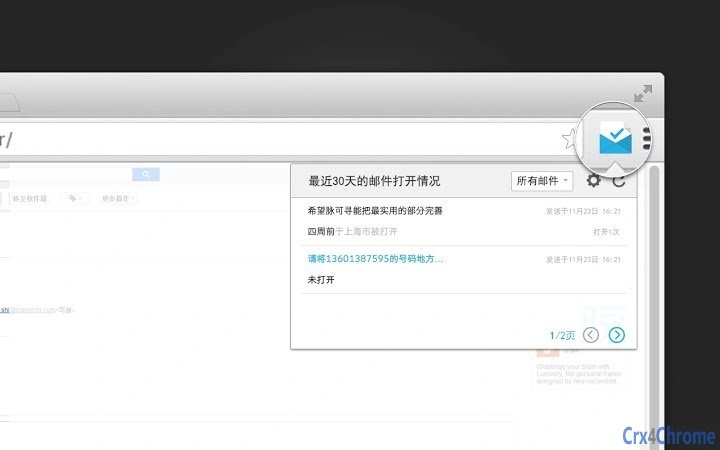
PulseTrack is a desktop application designed to provide visibility into email engagement by tracking when and where emails are opened. The software is specifically tailored for users who rely on browser-based email services such as 163, 126, and QQ Mail. It enables users to monitor real-time email activity, including the exact time an email was accessed and the geographical location of the recipient, assuming the email is opened in a supported browser environment.
Target users include professionals, marketers, and business communicators who need to assess response timing and recipient engagement. The tool supports a streamlined workflow for users who send emails through webmail platforms, offering insights that help improve outreach effectiveness. While the developer, 脉可寻, has not disclosed additional background information, the application’s focus on email tracking within specific Chinese email ecosystems suggests a regional specialization.
Real-world usage scenarios include follow-up scheduling, campaign performance evaluation, and verifying message delivery. The software operates in the background after installation, integrating with the browser session to capture tracking data without requiring manual input. This automation enhances efficiency for users managing high-volume email communication.
Key Features & Capabilities
- Email Open Detection – Monitors when a recipient opens an email sent via 163, 126, or QQ Mail through a supported browser.
- Timestamp Tracking – Records the exact time an email was opened, enabling users to time follow-ups accurately.
- Geolocation Insight – Identifies the approximate location of the recipient based on the IP address at the time of email access.
- Browser Integration – Works seamlessly within browser environments where supported email services are accessed.
- Lightweight Design – With a file size of 1.2 MB, the application consumes minimal system resources.
These features allow users to gain actionable insights into email engagement patterns. For example, a sales representative can use the timestamp to send a follow-up message within minutes of an email being opened, increasing the likelihood of a response. Similarly, a marketing team can analyze open rates by region to refine targeting strategies. The tool does not alter the email content or require recipient consent, operating passively once installed.
User Interface, Workflow & Performance
The user interface of PulseTrack is designed to be minimal and functional, focusing on core tracking operations without unnecessary complexity. Navigation is straightforward, with a single dashboard displaying tracking logs, open times, and location data. Users can view past tracking events in chronological order, with filters available to sort by email, date, or location.
Workflow efficiency is enhanced by automatic detection of email opens without requiring user intervention. After installation, the software runs in the background, monitoring browser activity related to supported email services. The developer did not specify resource usage details, but the compact file size suggests low CPU and RAM consumption. Stability appears consistent based on general software behavior patterns for lightweight utilities.
There are no visible performance bottlenecks reported in the provided data. The application does not interfere with browser performance or email delivery, and no issues were noted regarding crashes or freezes. However, exact performance metrics were not disclosed.
Compatibility & System Requirements
PulseTrack is compatible with both Windows and Mac operating systems. The software is designed to work with browser-based versions of 163, 126, and QQ Mail, meaning it operates within the web environment rather than as a standalone email client. The installation size is 1.2 MB, indicating a lightweight footprint suitable for most modern desktop systems.
Exact system requirements were not listed. The developer did not provide additional information about minimum CPU, RAM, or disk space needs. Compatibility with specific browser versions or operating system builds is also not specified. Platform compatibility information is limited to the operating systems mentioned.
Users should ensure their system supports the required browser environment for the tracked email services. No additional dependencies were indicated, but the software’s reliance on browser sessions means it may not function if browser security settings block tracking scripts.
Pros and Cons
Pros
- Real-time tracking of email opens in 163, 126, and QQ Mail
- Provides precise timestamps and geolocation data
- Lightweight with a 1.2 MB file size
- Free to use with no hidden costs
- Simple, automated workflow with minimal user input
Cons
- Support limited to three specific Chinese email services
- Exact system requirements not disclosed
- Relies on browser environment; may not work with all browser configurations
- Geolocation accuracy depends on IP data, which may not be precise
- No information on update frequency or future development plans
FAQ Section
Is PulseTrack compatible with all email services?
PulseTrack currently supports only 163, 126, and QQ Mail when accessed through a web browser. It does not support other email providers such as Gmail, Outlook, or Yahoo.
How does the email tracking work?
The software tracks when an email is opened by detecting activity within the browser session of the supported email services. It records the time and approximate location based on the IP address at the time of access.
Is PulseTrack safe to use?
As a lightweight desktop tool, PulseTrack operates within browser sessions and does not collect personal data beyond what is necessary for tracking. However, users should ensure their browser settings allow background monitoring.
Does PulseTrack require an internet connection?
Yes, an active internet connection is required for the software to function, as it needs to communicate with the tracking service and retrieve location data.
Can I use PulseTrack offline?
No, PulseTrack cannot operate in offline mode. It requires an active connection to track email opens and update the dashboard.
Final Thoughts & CTA
PulseTrack delivers a focused, effective solution for users who need to monitor email engagement within specific Chinese webmail platforms. Its ability to track open times and locations adds a valuable layer of insight for professionals managing outreach and marketing campaigns. The free pricing model and lightweight design make it accessible and efficient.
While its compatibility is limited to three email services, the tool excels in its niche. Users who rely on 163, 126, or QQ Mail will find it a practical addition to their productivity toolkit. For those seeking a simple, secure way to see who opened their emails, PulseTrack offers a compelling option.
Download PulseTrack now.
Guides & Tutorials for 脉可寻-邮件追踪 Extension for Chrome
How to install 脉可寻-邮件追踪 Extension for Chrome
- Click the Preview / Download button above.
- Once redirected, accept the terms and click Install.
- Wait for the 脉可寻-邮件追踪 Extension for Chrome download to finish on your device.
How to use 脉可寻-邮件追踪 Extension for Chrome
This software is primarily used for its core features described above. Open the app after installation to explore its capabilities.
User Reviews for 脉可寻-邮件追踪 Extension for Chrome 0
No reviews found





